Browse help topics
Report an incident
Open the shift, tap Report an incident, fill the details, and slide to submit the report.
Last updated · 2 August 2026
You can report a safety incident straight from the shift, whether or not you are clocked in. You record the facts of what happened; the office classifies the incident afterwards.
Open the report
In the shift, scroll to the foot of the details and tap Report an incident (labelled “Log a safety event”). This is available at any point in the shift, whether or not you are clocked in; the one exception is a shift still waiting on your accept or decline.
Confirm who was involved
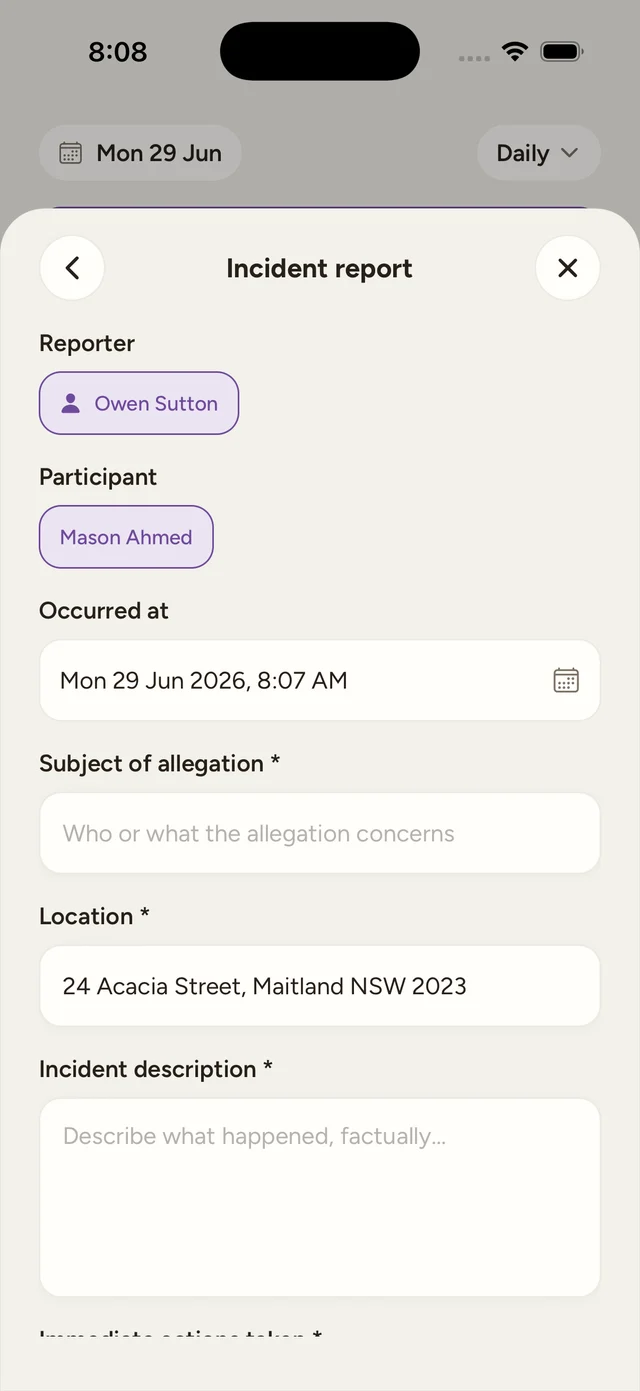
Reporter is filled in with your name and cannot be changed. On a 1:1 shift the participant is fixed. On a group shift, every participant is selected by default, so deselect anyone the incident does not involve, keeping only those it does.
Fill in the details
Set Occurred at (it defaults to now; tap it to open a date and time picker) then complete the required fields: Subject of allegation (who or what the allegation concerns), Location (a searchable address field, prefilled from the shift location), Incident description (what happened, factually), and Immediate actions taken (what you did right after). Each of those labels carries an asterisk in the form because all four are required. You can add photos while you are online.
Slide to submit report
Drag Slide to submit report all the way across. It stays disabled until the subject, location, description, immediate actions, and at least one participant are filled in.
The office sets severity and reportability
There is no severity field or reportable flag on the mobile form. You report what happened and what you did; the office reviews the report and classifies it on the web.
Tip
If you report while offline, the incident is queued and submitted when you reconnect, but photos cannot go up offline. Add any photos once you are back online, or on the web.
If a photo fails to attach
Once the report itself is in, any staged photos upload one by one. If one of them cannot upload, you still see “Incident saved” with a note that some photos could not be uploaded, and you can add them again from the web instead. The report is never lost because a photo failed.