Browse help topics
Establishment fee tasks
Eligibility, the prompt on the Service Agreements tab, and generating the one-off establishment-fee claim.
Last updated · 2 August 2026
The NDIS Establishment Fee is a one-off fee for taking on a new participant relationship. Unlike NF2F and NDIA-requested report tasks, it is not about work you log, it is a flat claim you make once a participant’s committed supports cross the NDIS threshold. Most establishment-fee tasks start from a prompt on the participant’s signed service agreement; you can also add one by hand.
Eligibility
A participant is eligible when all of these are true:
- First-time: no establishment fee has been claimed for this participant by your organisation before.
- Signed service agreement: the participant’s current agreement is signed, and it includes supports from one of five specific NDIS registration groups (below), not the whole of Category 01/04.
- Committed hours: that one agreement commits at least 20 hours a month of those supports, for a term of 3 or more consecutive months. This comes from the Monthly hours field you set on each agreed support item when building the service agreement, not hours actually delivered.
Note
Eligibility is a whitelist of exactly five NDIS registration groups, not “Category 01/04 minus SIL”: 0104 (High Intensity Daily Personal Activities), 0107 (Daily Personal Activities), 0125 (Participation in Community, Social and Civic Activities), 0133 (Specialised Supported Employment) and 0136 (Group and Centre Based Activities). Other Category 01 or 04 supports, including Supported Independent Living, do not count even though they sit in the same categories. If a participant’s committed hours look right but the fee still is not eligible, check that the supports carrying the hours are actually from one of these five groups.
Note
The hours and the term must come from the same agreement. They are never added up across two agreements, and the term is counted in whole calendar months with the end date included, so 1 January to 31 March is three months but 1 January to 18 March is two. An agreement with no end date has no term and is never eligible.
How the task gets added
The prompt appears at the top of Service Agreements
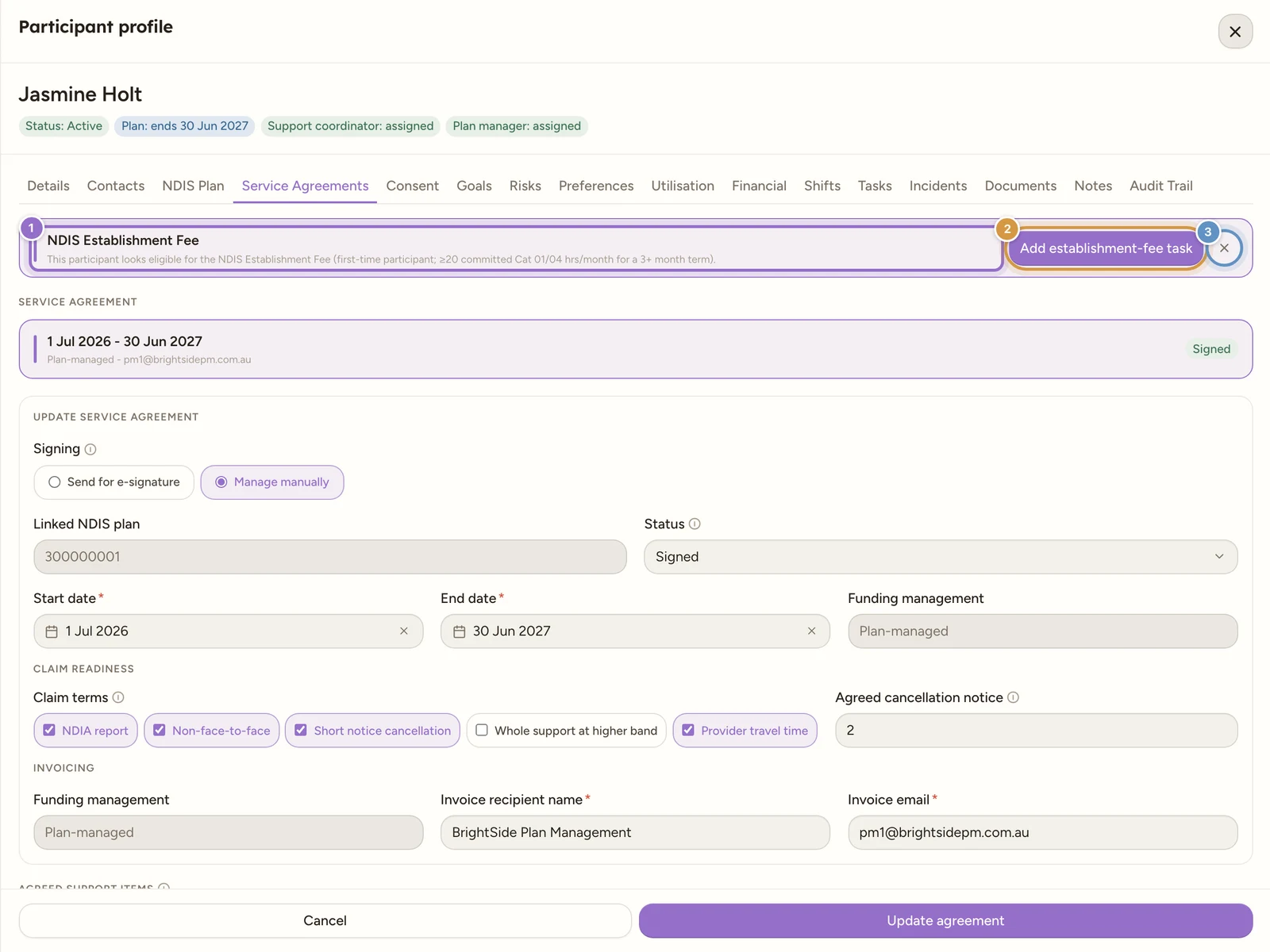
Open the participant (Participants), then select the Service Agreements tab. When the current agreement is Signed and its committed hours meet the eligibility rule above, a brand-tinted bar sits at the very top of the tab, above the agreement register, headed NDIS Establishment Fee: “This participant looks eligible for the NDIS Establishment Fee (first-time participant; ≥20 committed Cat 01/04 hrs/month for a 3+ month term).”
Add the task, or dismiss the prompt
Select Add establishment-fee task to create it, or the X at the right of the bar to dismiss it. There is no “Not now” button and no confirmation on the X: dismissing stops the bar reappearing for that agreement, permanently, though it does not remove the participant’s eligibility. A new agreement for the same participant gets its own prompt.
Adding shows “Establishment-fee task added.” and the bar clears. The new task is titled Claim establishment fee for [participant name], starts in the To do lane with Normal priority, is left unassigned, and is linked to the participant. Its description records why it exists: “Created from the signed service agreement: the participant meets the establishment-fee criteria (first-time participant, >= 20 committed Cat 01/04 hrs/month for a 3+ month term).”
Watch out
Adding is safe to retry: if a task already exists for this participant, or the fee has already been claimed, nothing is duplicated and you see “Could not add the establishment-fee task.” instead. You can hit this on a brand-new agreement for a participant whose fee was claimed under an earlier one: the dismissal is tracked per agreement, but the one-off fee is tracked per participant.
Adding one by hand
You do not have to wait for the prompt. On Schedule›Tasks, select Create task, choose the Establishment fee type, and pick the Participant. It is the only field the type needs, see Create a task. Creating it this way does not check eligibility, that happens when you generate the claim.
Generating the claim
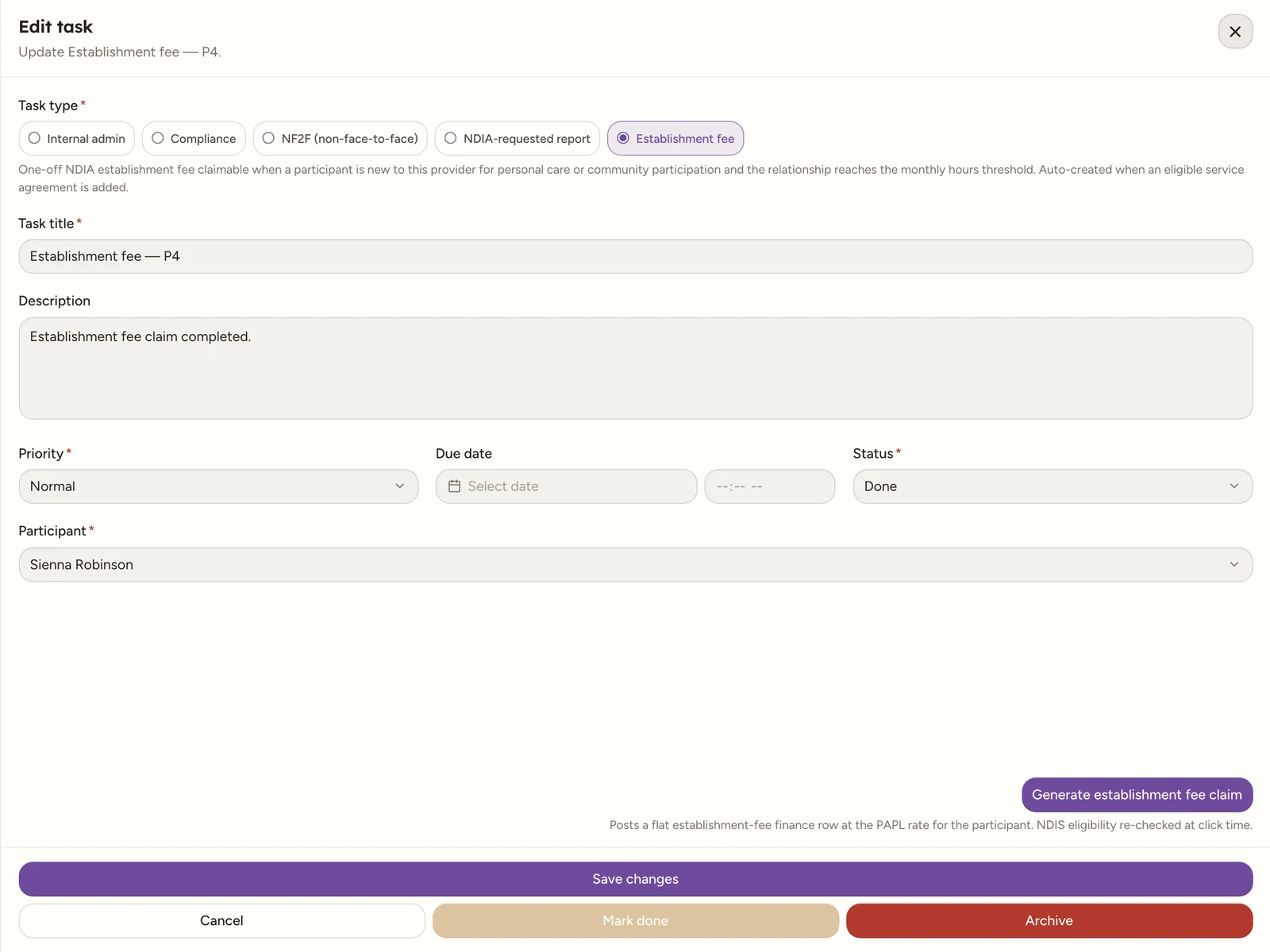
Open the task. Its Edit task drawer works the same as any other, see Create a task. The claim button sits at the right-hand end of the Task type pills row, past the last pill, and unlike NF2F and NDIA-requested report it shows regardless of the task’s status: you do not need to mark it Done first.
Note
The grey description under the type pills still reads “Auto-created when an eligible service agreement is added.” That sentence is out of date and is being corrected: nothing is created on its own. An eligible signed agreement raises the prompt, and the task exists only once somebody presses Add establishment-fee task (or creates one by hand).
Select Generate establishment fee claim. Eligibility is assessed fresh at this moment, not from when the task was added, so if the agreement changed in the meantime the claim can still be blocked.
On success, a flat establishment-fee finance row lands in Finance›Billing, ready to include on an invoice, and the task is automatically set to Done. The button is then disabled and reads “Claim generated ✓”.
Note
The fee is priced from the NDIS catalogue at the participant’s remoteness level, and the exact support item follows whichever of the five registration groups earned the eligibility, so a community-participation relationship claims a Category 04 item rather than a Category 01 one. All six variants carry the same price, so this only affects how the line reads on the claim.
If it is blocked
You see a message naming the first problem found:
| Message | Meaning |
|---|---|
| “Establishment fee has already been claimed for this participant.” | The one-off fee was already generated, from this task or an earlier one. |
| “No signed or active service agreement with personal care (Cat 01) or community participation (Cat 04) supports.” | The participant has no qualifying agreement right now. |
| “The agreement must commit at least 20 hours per month of Cat 01/04 supports (currently …).” | The committed Monthly hours on the agreement’s eligible supports fall short. |
| “The agreement term must be at least 3 consecutive months.” | The agreement’s start and end dates span less than 3 whole calendar months, or it has no end date. |
Tip
Fix the service agreement (extend the term, or raise the Monthly hours on an eligible support) and select Generate again.
Watch out
A claim can only be generated once per task. To redo it, archive the task and create a new one, then generate the claim again.