Browse help topics
Finalise a week and record payment
The finalise pre-flight, Finalise week, the per-worker Pay drawer, and Reopen.
Last updated · 2 August 2026
Finalising freezes a payroll week into an immutable snapshot: the exact hours, rates and dollar amounts are written to the pay record and stop reacting to later rate syncs or shift edits. Payment is then recorded worker by worker, not for the week as a whole, so the week reads as paid only once everyone in it has been paid. Every control described here needs the payroll:create permission; without it the buttons are disabled with a tooltip explaining why, though you can still read the grid and pull the CSV exports.
Review the finalise pre-flight
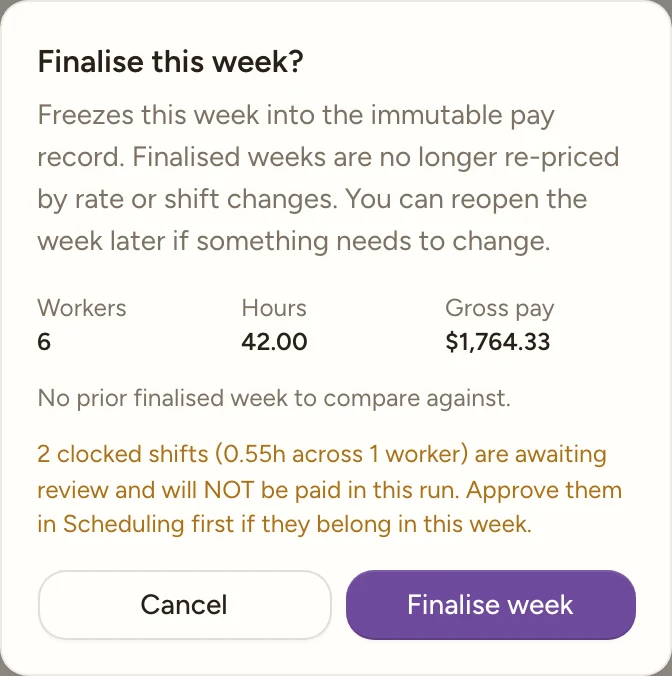
In the week navigation row, select Finalise week (top right). A confirm dialog titled Finalise this week? opens, warning “Freezes this week into the immutable pay record. Finalised weeks are no longer re-priced by rate or shift changes. You can reopen the week later if something needs to change.”
Above the Cancel / Finalise week buttons it shows what you are about to commit, as a small table with the columns Week, Workers, Hours and Gross pay. The first row is This week with the exact totals that will be written. When you have finalised a week before, a second row, Last finalised, carries that week’s gross for comparison.
Underneath sits the movement against that last run, for example “+4.2% vs last finalised week.” or, with no prior run to compare, “No prior finalised week to compare against.” Then an amber list of everything this run leaves out, drawn straight from the checklist: unreviewed shifts and their hours (“N clocked shift(s) (Xh across Y worker(s)) are awaiting review and will NOT be paid in this run. Approve them in Scheduling first if they belong in this week.”), unclassified workers (“N worker(s) [is/are] unclassified and will be recorded at $0 gross.”), and unseeded public holidays (“N public holiday(s) this week [is/are] not seeded and will be priced as ordinary days.”).
Confirm Finalise week
Select Finalise week in the dialog (it reads “Finalising…” while it saves). Nothing to fix is mandatory: the warnings are informational, not blockers. Beyond the payroll:create gate above, Finalise week is disabled when the page is still loading, when there are no rows to finalise, or while a finalise is already in flight.
Once it succeeds, the grid switches from live-computed to reading the frozen snapshot: rate changes and shift edits made afterward no longer affect this week’s figures. The Finalise pill in the checklist relabels itself Finalised on DD/MM/YYYY, and a Reopen button replaces the finalise button in the week navigation row.
Note
Finalising also pushes the week’s timesheets into Xero, when your organisation is connected and the week has not been pushed before. You do not have to do it from the export menu. If the push fails, finalising still succeeds and you see a warning instead of an error: “Week finalised. The Xero timesheet push failed, push from the export menu.” See Export payroll and push to Xero.
Record each worker as paid
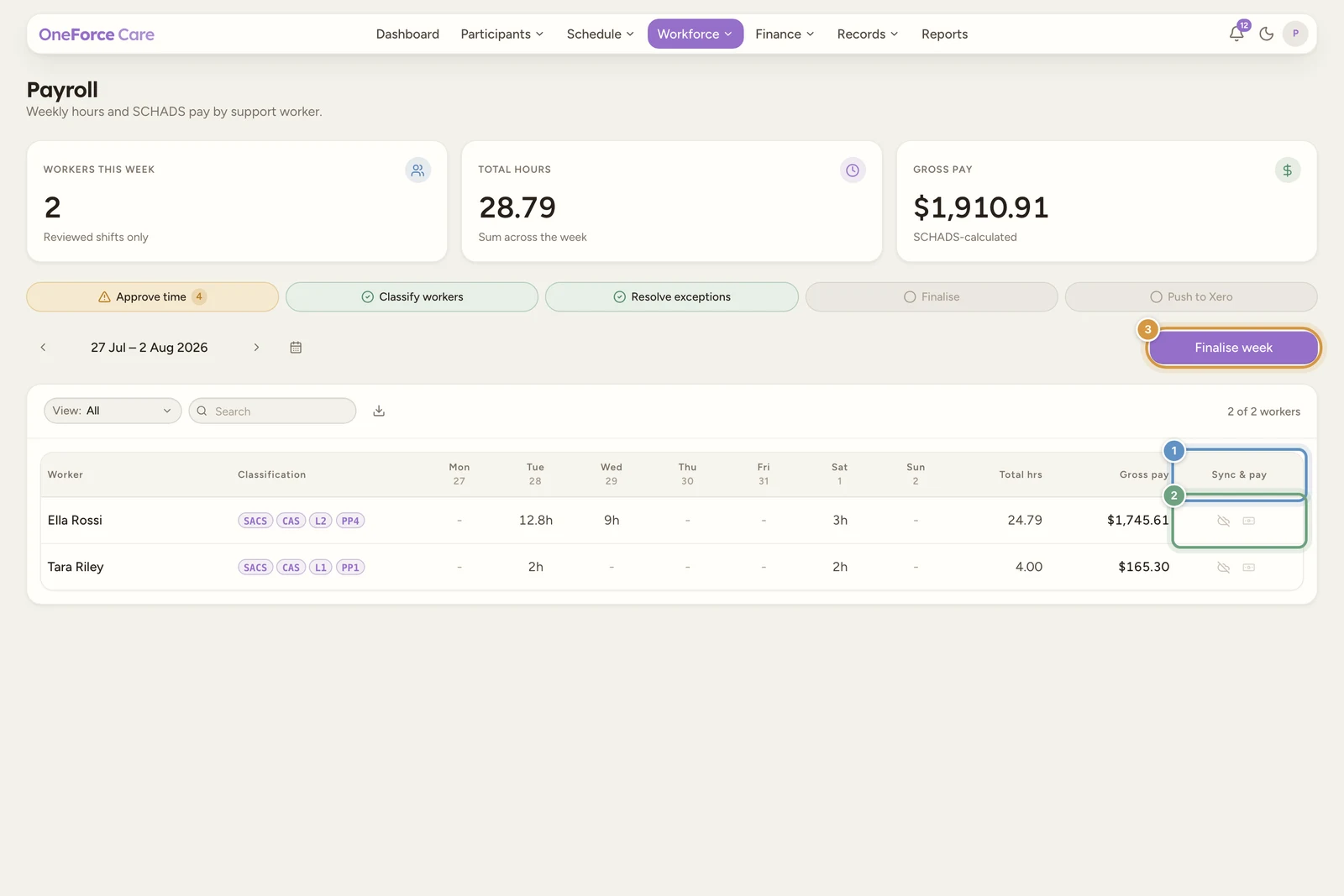
Payment is recorded per worker, from the Sync & pay column at the right of the weekly grid. Select the banknote icon on a worker’s row (it stays disabled until the week is finalised, with the tooltip “Finalise the week first”) to open the drawer Pay [worker name]: “Record this worker as paid for the finalised week. Add a payment reference and attach the bank batch report or remittance advice.”
| Field | Required | Notes |
|---|---|---|
| Payment reference | No | Placeholder “Bank batch id, ABA file, remittance note”. |
| Payment evidence | No | “Bank batch report, remittance advice, or receipts.” Attach as many files as you need, up to 10 MB each. |
Select Mark as paid. The worker’s banknote turns green and hovers as “Paid on DD/MM/YYYY. Ref: …”. Reopening the drawer afterwards shows a Paid on DD/MM/YYYY banner with the reminder “This is the as-paid audit record; it does not move money.”, the reference locked, and the submit button changed to Upload evidence so you can still add files. An Unmark paid button sits beside it if you recorded the wrong worker.
Note
The week reads as paid only when every worker in it is paid. The Finalise checklist pill relabels itself Paid on DD/MM/YYYY at that point, dated by the most recent worker payment. One worker left unpaid keeps the week on “Finalised on …”.
Reopen a finalised week
Select Reopen to open Reopen this finalised week?, warning “The saved snapshot is discarded and the week recalculates from current shifts and rates. Any recorded worker payments for this week are discarded with it.”
Confirm Reopen (it reads “Reopening…” while it runs). The week immediately reverts to a live computation from current shifts, classifications and rates, exactly as it was before it was ever finalised, so anything you fix afterward (approving a late shift, correcting a classification) is reflected the next time you finalise.
Watch out
Reopening throws away the recorded worker payments along with the snapshot, as the confirm says. If you reopen a week that was already marked paid, every worker in it will need marking paid again after you re-finalise, and their references and evidence will need re-entering. Note the references somewhere first if you will need them.
Watch out
Reopening a week that has already been pushed to Xero payroll clears the “already pushed” flag along with the snapshot. If you reopen, fix something, and re-finalise, the timesheets push again, so check Xero for any draft timesheet already created before you re-finalise.
Tip
With the totals committed, pull the CSVs or check where the Xero push got to: see Export payroll and push to Xero.