Browse help topics
Export payroll and push to Xero
The two CSV exports, and how the Xero timesheet push matches workers and pay items and handles sleepovers and allowances.
Last updated · 2 August 2026
The download icon above the grid (titled Export CSV) opens a menu with the two CSV exports, plus Push timesheets to Xero when it applies. It is disabled while the page is loading or when there are no rows for the week. Both CSVs export every worker in the week, not just the rows on screen: the View picker and the search box only shape the table, and neither narrows the download. Figures are live-computed for an open week and the frozen ones for a finalised week. Neither export needs the payroll:create permission: a payroll:read reviewer can pull them to cross-check even without edit rights.
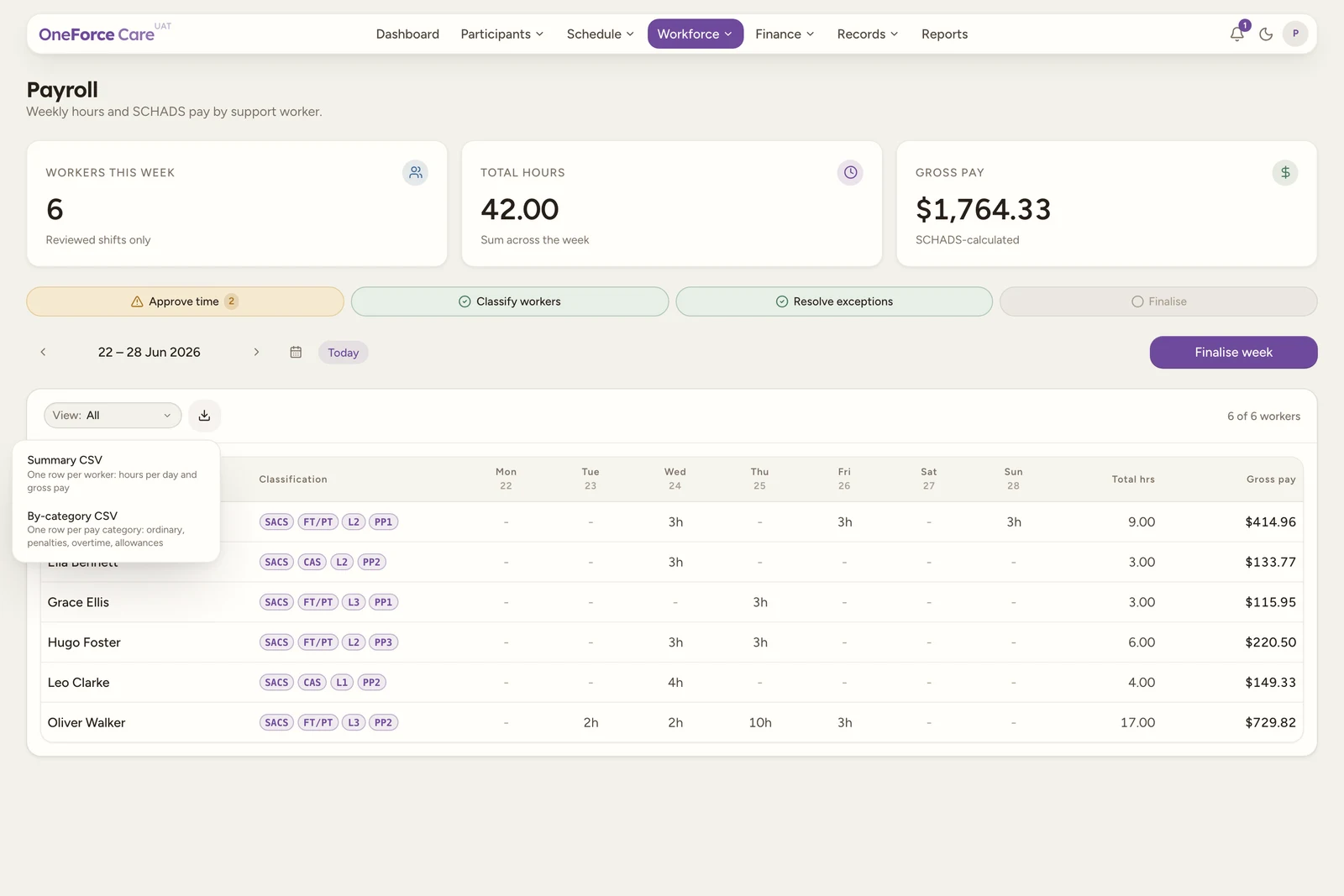
A third item, Push timesheets to Xero, joins the menu only for a connected organisation on a finalised week that has not been pushed.
Download the Summary CSV
Select Summary CSV (“One row per worker: hours per day and gross pay”). It downloads as payroll-week-[weekStartIso].csv with one row per worker: Worker, SCHADS classification (the joined classification labels, or “Unclassified”), Mon hrs through Sun hrs, Total hrs, Sleepover hrs (allowance only), and Gross pay (AUD). An unclassified worker’s Gross pay cell is left blank rather than “0.00”, so a downstream import can’t mistake it for an actual zero-dollar pay run.
Download the By-category CSV
Select By-category CSV (“One row per pay category: ordinary, penalties, overtime, allowances”). It downloads as payroll-week-[weekStartIso]-by-category.csv with one row per worker per pay category: Worker, SCHADS classification, Pay category, Hours, Rate (AUD) and Amount (AUD).
Categories appear in this order, only when the worker has hours in them: Ordinary, Afternoon shift, Night shift, Saturday, Sunday, Public holiday, Overtime (first period), Overtime (after period), Rest break (double time), Broken shift double time, Sleepover (allowance only), Unclassified. Each worker can then get up to three extra rows for their per-worker allowances, with Hours and Rate left blank and only Amount filled: Broken shift allowance, Vehicle allowance (per km) and Sleepover allowance.
Push timesheets to Xero (usually already done)
Push timesheets to Xero (“Creates draft timesheets in Xero payroll from the finalised week”) appears in the menu only when all three are true: Xero is connected under Account›Integrations, the displayed week is finalised, and this week has not already been pushed cleanly. If any of those is not true, the item is simply not in the menu: there is no disabled state to explain it. The same action also sits as a Xero-blue Push to Xero button beside Reopen in the week navigation row.
In practice you will rarely need either, because finalising a week pushes its timesheets automatically (see below). The manual item is there for a push that failed, and for a retry after you have added the missing workers to Xero.
However it is triggered, OneForce Care reads the week’s frozen snapshot and creates DRAFT timesheets in Xero payroll, one per worker with payable hours. On success you see “1 draft timesheet created in Xero payroll.” or “N draft timesheets created in Xero payroll.” If any workers were skipped, a second message follows: “Skipped N worker(s): [first worker], [first reason]” (only the first skipped worker’s reason is shown, even when several were skipped).
Finalising pushes the timesheets for you
When your organisation is connected to Xero and the week has never been pushed, finalising the week sends its timesheets across in the same action. There is nothing to press and no separate step to remember.
- On success you get the ordinary push toast, “N draft timesheets created in Xero payroll.”
- If the push fails, the week is still finalised. The toast is a warning rather than an error: “Week finalised. The Xero timesheet push failed, push from the export menu.” The real reason is put where you can act on it: the checklist’s Push to Xero pill turns amber, and each affected worker’s cloud icon in the Sync & pay column names what is wrong with that worker.
- A retry sends only the workers who were skipped last time. Workers already in Xero are never pushed twice, so fixing one missing employee and pushing again adds just that person’s timesheet.
Tip
The quickest way to see who was left out is the Sync & pay column: a crossed-out cloud means “No Xero employee named ‘[name]’. Add them in Xero payroll to include them.” Add the employee in Xero, then push again from the export menu.
How workers and pay items are matched
The push never has any settings of its own to configure; it matches everything by name against what is already in Xero:
- Workers are matched to a Xero employee by full first name + last name (case-insensitive, extra spaces ignored). No match skips that worker entirely, with the reason
no Xero employee named "[name]". - The matched employee must have a payroll calendar assigned in Xero, and it must be weekly or fortnightly and its pay period must fully contain the Monday-Sunday payroll week. Otherwise the worker is skipped with
the Xero employee has no payroll calendar assigned,unsupported pay calendar type (only weekly and fortnightly periods can receive timesheets), orthe Xero pay calendar period does not contain the full payroll week. - Each pay category’s hours are matched to a Xero pay item (earnings rate) by name. The name is the full penalty label, including the percentage and the employment type: a full-time or part-time worker’s Saturday hours look for a Xero pay item named exactly “Saturday, 150% (FT/PT)”, while a casual’s look for “Saturday, 140% (casual)”. Matching ignores case and extra spaces, but nothing else. If no Xero pay item has that exact name, the worker is skipped with
no Xero pay item named "[name]" (add it in Xero, or map the code in pay item overrides)- in practice this means creating the matching pay item in Xero, since there is no in-app screen for the override yet.
Watch out
A worker is only ever pushed whole. If any single category can’t be matched to a Xero pay item, that worker’s entire timesheet is skipped rather than pushed with a gap, so nothing goes into Xero half-right.
The pay item names Xero needs
Because the name carries the percentage and the employment type, the full-time/part-time and casual loadings are separate Xero pay items. Set up the ones your workers actually earn, spelled exactly as below. (These are the push’s matching names, not the friendlier category labels used in the By-category CSV.)
| Pay category | Full-time / part-time pay item | Casual pay item |
|---|---|---|
| Ordinary hours | Ordinary hours | Ordinary hours |
| Afternoon shift | Afternoon shift, 112.5% (FT/PT) | Afternoon shift, 110% (casual) |
| Night shift | Night shift, 115% (FT/PT) | Night shift, 112% (casual) |
| Saturday | Saturday, 150% (FT/PT) | Saturday, 140% (casual) |
| Sunday | Sunday, 200% (FT/PT) | Sunday, 180% (casual) |
| Public holiday | Public holiday, 250% (FT/PT) | Public holiday, 220% (casual) |
| Overtime, first period | Overtime, first period, 150% | Overtime, first period, 140% (casual) |
| Overtime, after first period | Overtime, after first period, 200% | Overtime, after first period, 180% (casual) |
| Rest break after overtime | Rest break <10h after overtime, double time (cl. 28.3) | (casuals are not paid this penalty) |
| Broken shift beyond 12h span | Broken shift, beyond a 12h span, double time | Broken shift, beyond a 12h span, double time |
Note
You only need the pay items for the bands a worker actually works, so most organisations start with Ordinary hours plus the weekend and public-holiday rows and add the rest as they come up. Sleepover never needs a pay item here: sleepover is allowance-only and never travels with the push (see below).
What never goes into the Xero timesheet
- Sleepover hours are excluded from every timesheet line. They are allowance-only pay under SCHADS cl. 25.7, never worked time, so they are dropped before the push builds anything: they can never appear as hours in a Xero timesheet.
- Fixed dollar allowances don’t travel with the push at all. A Xero timesheet only carries hours against a pay item, not a flat dollar amount, so the sleepover, broken shift and vehicle (per km) allowance amounts shown on the grid’s worker drawer and in the By-category CSV are not part of the pushed data. Key these into Xero by hand, as a manual payslip earnings line, using the figures from the drawer or the CSV.
Errors you might see
| Message | What it means |
|---|---|
| “Finalise the week before pushing timesheets to Xero.” | No finalised run exists for this week (normally can’t happen from the menu, since the option only shows for a finalised week). |
| “This week has already been pushed to Xero.” | Someone else pushed this week moments before you, or every worker in it is already across. |
| “Xero rejected the push. Hover the cloud icons in Sync & pay to see what needs fixing for each worker.” | The push reached Xero and came back with errors. The per-worker reasons are on the cloud icons in the grid. |
| “Nothing could be pushed. [reason]” | Every worker was skipped, or the finalised week has no payable hours at all. |
| “You do not have permission to push timesheets for this provider.” | Your role has payroll:read but not payroll:create; the menu item is visible either way, but the push itself needs payroll:create. |
| “Xero payroll access has not been granted for this connection. Reconnect Xero (the consent must include payroll), and check the organisation has AU Payroll enabled.” | The Xero connection is missing payroll access; reconnect Xero from Account›Integrations and grant payroll on consent, and confirm the Xero organisation has AU Payroll turned on. |
Tip
Reopening a finalised week that was already pushed clears the pushed flag along with the snapshot, so re-finalising pushes again. See Finalise a week and record payment for everything else reopening resets, including the recorded worker payments.
Note
Timesheet status flows back too. A background sync every 30 minutes asks Xero what became of each pushed timesheet, so the cloud icon in Sync & pay moves from “Pushed to Xero - Draft timesheet” through Approved to Processed without anyone refreshing anything.