Browse help topics
Budget utilisation
Spend against allocation per budget pool, support-level usage, and finance blockers.
Last updated · 2 August 2026
The Utilisation tab is a read-only view of how the plan budget is tracking, so you can see remaining funds and keep delivery in line with what is funded. Open the participant, then select the Utilisation tab.
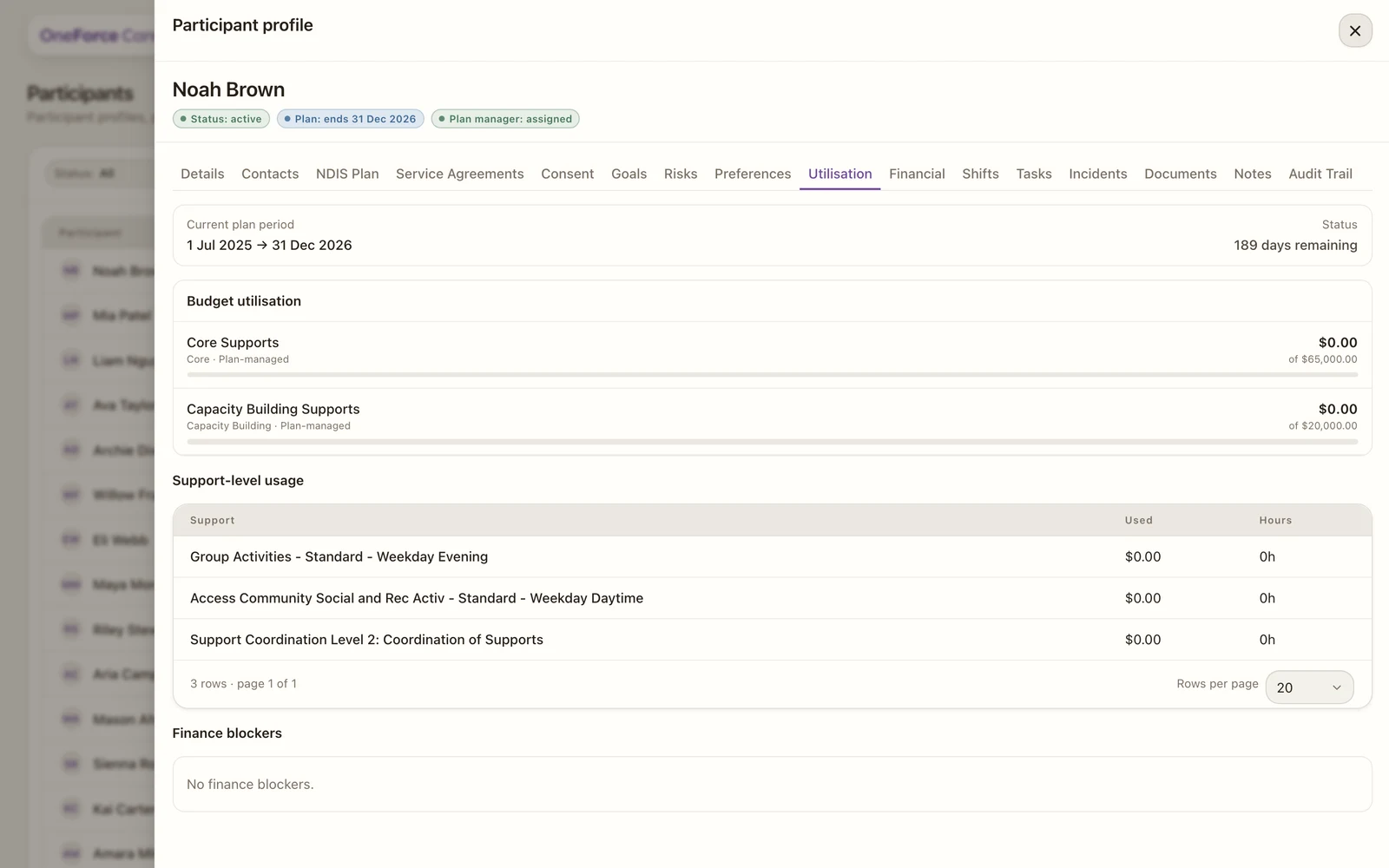
Once the participant has a plan and delivery, the tab shows four sections, one under the other:
- Current plan: the plan period and how long is left to spend it, counted down as “N days remaining”. Inside the last 30 days it turns amber and the wording changes to “N days, expiring soon”. Once the end date has passed it reads Expired, in red.
- Budget utilisation: for each budget pool, the amount used against its allocation, with a progress bar that goes amber at 80% and red at 100%. Watch for pools nearing their limit, or sitting unused with little time left. A pool whose amount you have not confirmed reads Budget unknown, with the note that the percentage stays hidden until the budget amount is known.
- Support-level usage: a breakdown by agreed support item, with dollars used and hours delivered. It reads No service agreement supports yet. until supports are on the agreement.
- Finance blockers: a list of the delivered work that is not counting towards the figures above, one amber line per affected shift, naming its date and what is holding it up, for example a Stated budget with no support codes on the agreement. When everything is clear it reads No finance blockers.
Only work that is ready to claim or already invoiced counts as used, so anything still awaiting review or on hold is not in the totals yet. Finance blockers is where to look for the reason, since a check against an item is the usual cause. Clear those and the figures catch up.
Use the tab to avoid over-delivering against a pool, or leaving funds unspent before the plan ends.