Browse help topics
Review and approve assignments
Use the Assignments register to check the times, correct them if needed, and approve each worker after the shift.
Last updated · 23 September 2026
After a worker has clocked in and out, an admin checks the times and approves the assignment. Approving is the sign-off that lets the work be claimed.
Open the Assignments register
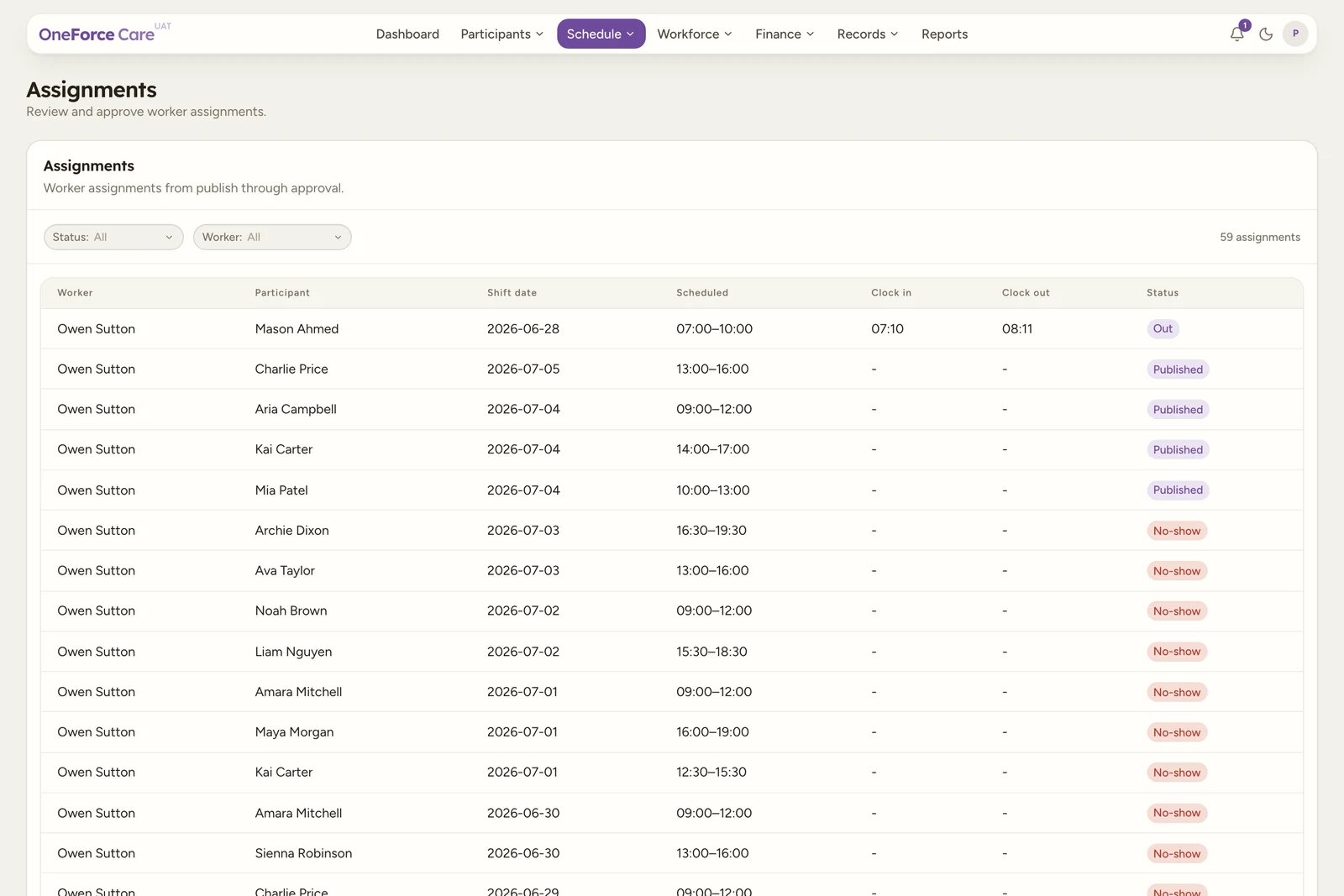
Go to Schedule›Assignments. The register lists every assignment from the moment it is published, newest first, with its scheduled and actual times.
Review the assignment
Select a row to open the review drawer. It is the same Worker assignments drawer used to manage the shift, scoped to that one worker. Its Timesheet section shows Clock in, Clock out, Total time worked and Workflow status, followed by Participants serviced. A Progress notes section below it shows the worker’s submitted note (or “No progress note submitted yet.”), any Shift summary text, and a Photos gallery of anything the worker added on mobile.
On a group run, Participants serviced carries an attendance status per person: Complete, Left early, No show, Cancelled, and two that need your attention:
- Not picked up (a warning, 0 min): the worker clocked off without ever collecting this participant.
- To pick up: the run has not reached them yet.
Two more only ever show before the worker clocks out, which is before the review you are doing here: Not started (the worker has not clocked in yet) and In session (clocked in, still with this participant).
If the assignment has open claim-risk warnings, a yellow Claim review block appears above Progress notes, headed “This assignment has claim-risk warnings.”, listing each one with “Review each warning before approving.” underneath.
Correct the clocked times, if you need to
Owners and admins get an Edit times button beside Approve, once the worker has clocked in and while the assignment is still unapproved. Use it when a worker forgot to clock out, clocked in early, or the window plainly does not match what happened.
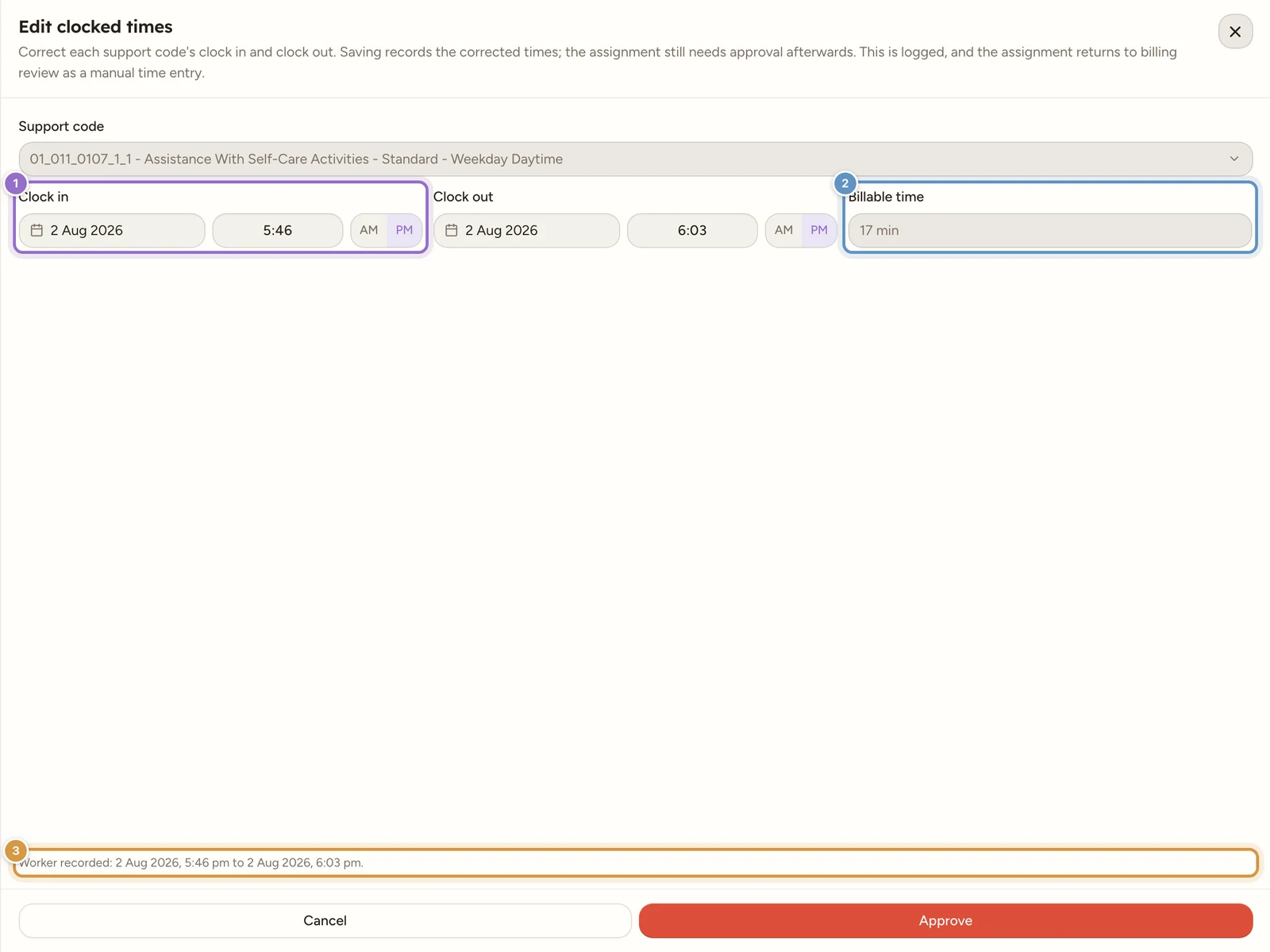
The drawer is titled Edit clocked times: “Correct each support code’s clock in and clock out. Saving records the corrected times; the assignment still needs approval afterwards. This is logged, and the assignment returns to billing review as a manual time entry.”
- There is one block per time-based support code on the assignment, so a shift that crossed a rate band is corrected code by code. The support code itself is shown but not editable.
- Worker recorded: [start] to [end] stays pinned above the footer as your reference. It is always the worker’s original stamps, even after you have edited before.
- The red button at the foot is labelled Approve, but it saves the correction only; it does not approve the assignment. There is no Save button to look for. Approve the assignment afterwards from the timesheet row, which asks “Approve edited times?”.
Pressing Approve on an assignment whose times and support allocation disagree opens this same drawer for an admin, rather than leaving you at a dead end.
Note
The worker’s own times are never overwritten. The correction is recorded alongside them, is logged, and follows the money: the finance rows return to Needs reconfirmation with “Worked time was manually edited by the office.” and an Edited time panel comparing what the worker recorded, what the office changed it to, and what was billed. One time edit can fan out into several band rows, so the billing register offers Include all in billing (N) to clear them together.
Approve
Select Approve, then confirm in the dialog.
- With no warnings it reads Approve assignment? / “This confirms the actual clock times have been checked by an admin.”
- With claim-risk warnings it lists them and asks you to review each one before approving.
- After a time correction it reads Approve edited times? and shows a diff table: the date, then Worker recorded and Changed to, with rows for Clock in and Clock out and the changed values emphasised. It widens when the edit crosses days.
When every worker on a shift is approved, the shift becomes Approved; while only some are done it shows Part approved.
The attendance warnings at approval
Two warnings appear in the Claim review block and again on the Approve confirmation, and they are the ones worth stopping for. Both are advisory: approval still goes through, but you have to push past them consciously, and they show even in the lean edited-times confirm.
{Name} was never picked up. Confirm with the worker what occurred; if they did not attend, cancel them on this shift so the share claims as a cancellation, not delivered support.
{Name} was marked a no-show by the worker. Cancel them on this shift so the share claims as a cancellation, not delivered support.
If you approve anyway, that participant’s share is not quietly claimed as delivered support. It lands in Needs reconfirmation on the Billing register with the reason “The worker never picked this participant up on the group run. Decide whether to claim it as a Short Notice Cancellation or not at all before billing.”, numbered resolution steps and a link back to the shift.
Watch out
The right fix for a participant who was never collected is almost always to cancel them on the shift, so the share claims as a cancellation under the NDIS notice rules rather than as support that was not delivered. See Cancel a shift.
How approval feeds billing
Approving is the gate to claiming. An approved assignment confirms the times and support that were delivered, which is what billing and claiming draw on. Until an assignment is approved, it is not ready to claim.
Tip
You can also approve from the shift itself: open it, select Manage assignments, and use the same Approve and Edit times actions there.
Check clock locations and travel evidence
Clock-in and clock-out can include an approximate recorded location even when the workspace’s geofencing check is off. The location is evidence of a point in time, not continuous tracking through the shift. Poor reception may leave a location missing or less precise.
Open each recorded travel leg to compare Snap to Road and GPS Points, check the confidence label and confirm the destination and kilometres. See Travel on a shift. These checks sit alongside the worker’s times, notes and completed tasks before office approval.