Browse help topics
Your profile
Update your name, phone and sign-in email on the Account tab.
Last updated · 2 August 2026
The Account tab holds your own profile: how your name appears across the app and the email you sign in with. Your password and two-factor authentication live further down the same tab; see Password and two-factor authentication.
Open the Account tab
Select your initials at the top right, choose Account, then open the Account›Account tab (it’s the one that opens by default). It starts with a Profile card.
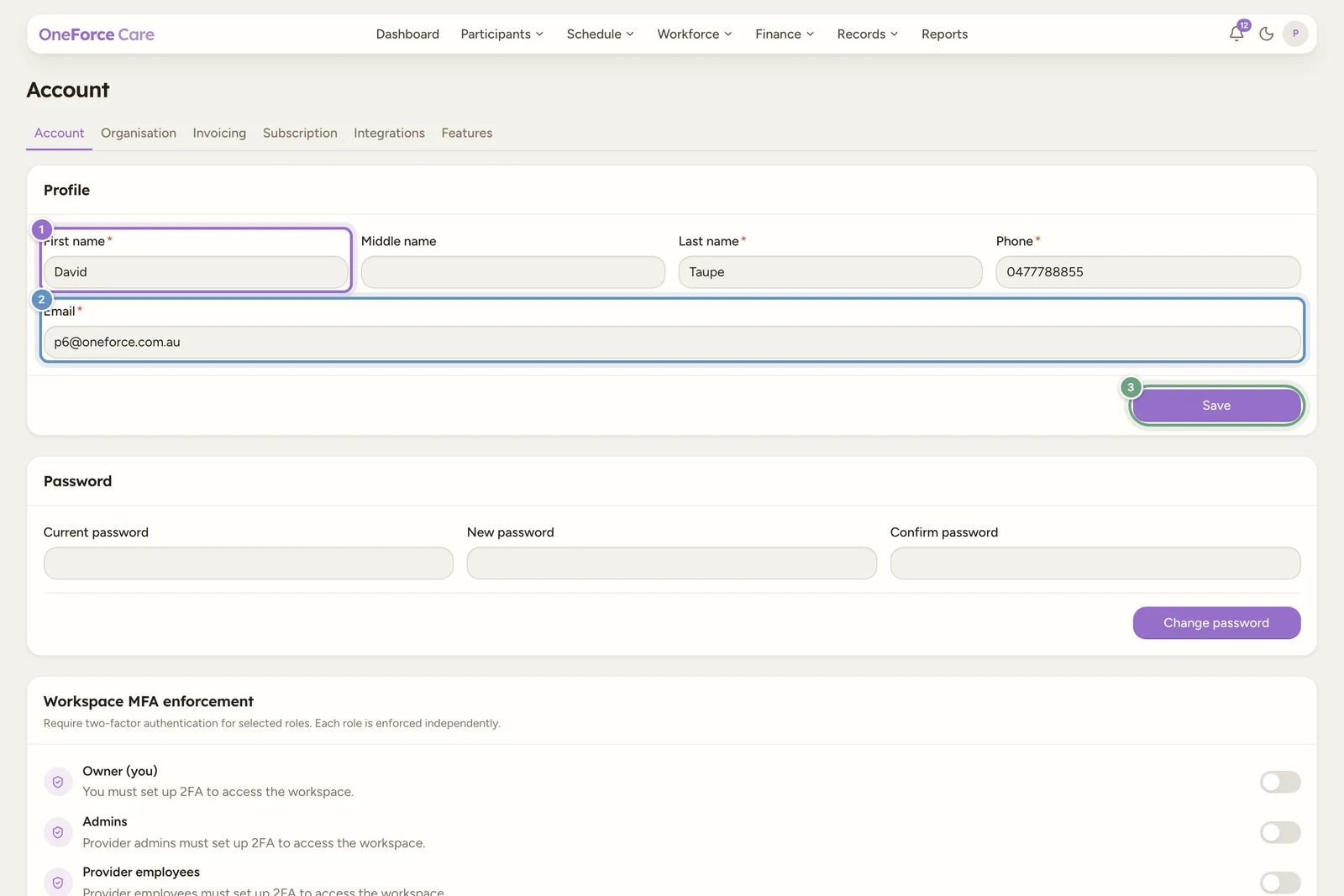
Edit your details
The fields are:
| Field | Required | Notes |
|---|---|---|
| First name | Yes | |
| Middle name | No | |
| Last name | Yes | |
| Phone | Yes | Australian format, for example 04XX XXX XXX |
| Yes | The address you sign in with |
Save
Select Save. If you changed nothing but your name or phone, you see Profile saved.
If you changed your Email, that address is your sign-in identity, so the change is not final until you confirm it. The toast reads Profile saved. Confirm the link sent to <email> to update your sign-in email. Open that email and select the link to finish the change.
Note
A wrong entry is shown as a message at the bottom of the screen, for example Enter a valid Australian phone number (e.g. 04XX XXX XXX or 0X XXXX XXXX). or Enter a valid email address. Fix the field and select Save again.
Tip
Set your password and two-factor security next: see Password and two-factor authentication.