Browse help topics
Worker compliance
Record each credential's expiry and evidence, and read the compliance status.
Last updated · 23 September 2026
The Compliance tab is the credential register for a support worker. Keeping it current is what keeps the worker safe to roster. It appears for support workers only.
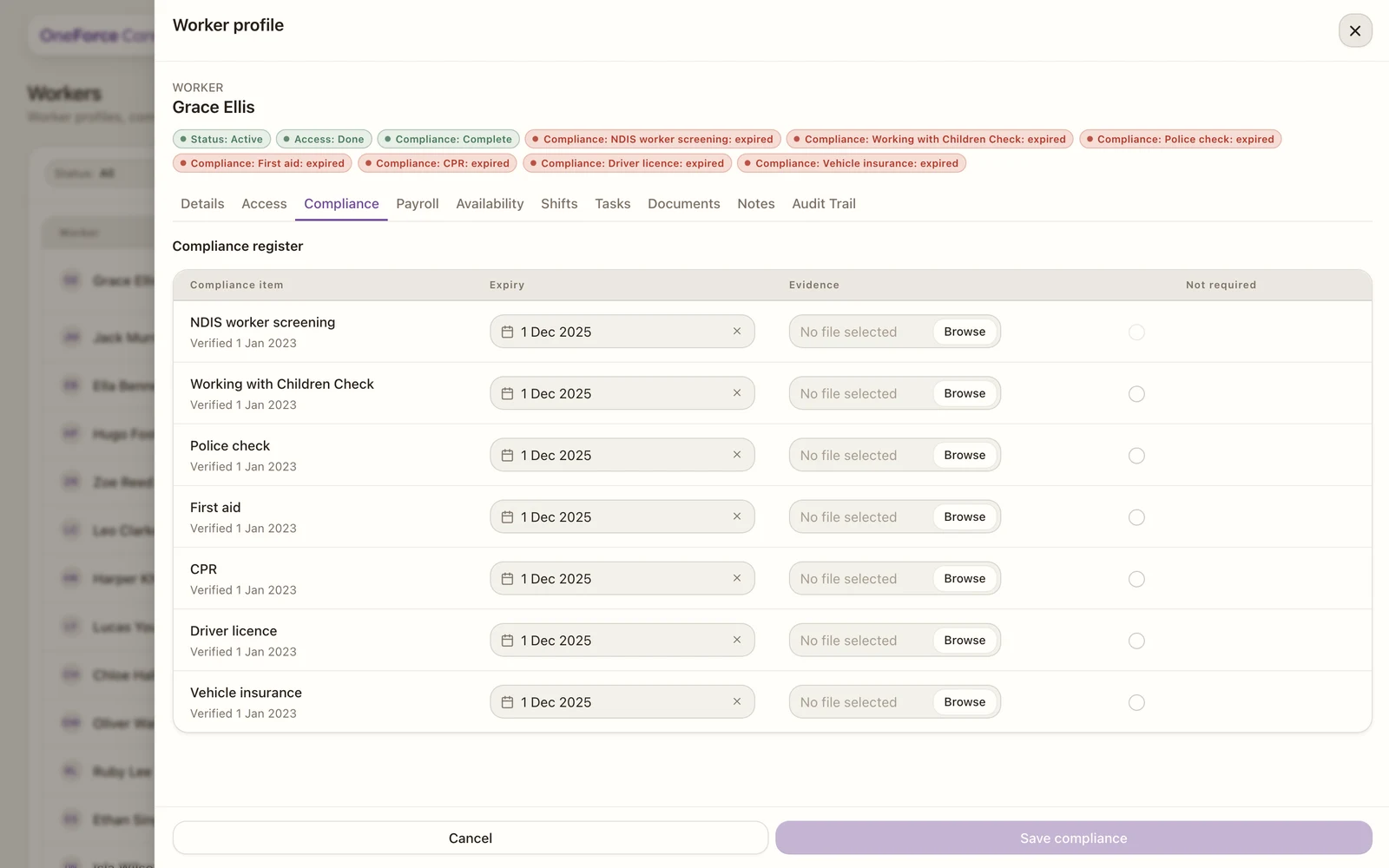
The register
The whole tab is one table, titled Compliance register, and every cell is editable in place. There is no separate add or edit form: change what you need across the rows, then save once.
| Column | What it holds |
|---|---|
| Compliance item | The credential’s name. It dims when the row is marked not required. |
| Expiry / completion | An expiry date for dated credentials, or a completion selector for NDIS modules. Disabled once Not required is ticked. |
| Evidence | The certificate file (PDF, image, Word or text). The saved file’s name shows here; the X clears or deletes it. |
| Not required | A tickbox for a check that does not apply to this worker. |
Note
There is no status column, and no “Verified” date under a row. Dated credentials use their expiry and NDIS modules use completion, so it is shown where it is useful: as a pill on the profile header, and as the Compliance filter on the Workers register. The register itself stays as one clean line per credential.
The credentials
Each support worker has a row for NDIS worker screening, Working with Children Check, Police check, First aid, CPR, Driver licence and Vehicle insurance, plus a row for Nursing registration and NDIS modules (and any extra type already on the worker).
Watch out
NDIS worker screening cannot be marked “Not required” for a support worker. Its tickbox is simply locked. The reason, “NDIS worker screening is required for support workers and cannot be marked not required”, is carried as the tickbox’s accessible label for screen readers, so there is no hover tooltip to read it from.
What the statuses mean
Dated credentials are worked out from their expiry:
- Current: more than 30 days left.
- Expiring: valid, but 30 days or fewer left, so it is time to renew. Exactly 30 days out already reads Expiring.
- Missing: no expiry recorded, or the date has already passed.
The worker’s overall compliance reads as Complete, Partial or Not Set on the profile header. Any item that is missing, expired or expiring also raises its own pill there, for example “Police check: expiring in 12 days”, and feeds the Compliance filter on the register, so you can see who needs attention before rostering. A Blocked status is set by hand, not from the dates.
Note
Nursing registration is only needed by workers who deliver Community Nursing supports, so it is not counted toward the overall Complete / Partial / Not Set status: leaving it blank never marks a worker incomplete. It matters at rostering instead: publishing a nursing shift against a worker with no current nursing registration is blocked until one is recorded here.
Saving, and removing evidence
Select Save compliance to record your changes. It stays disabled until at least one row changes, and the whole tab is read-only for a role without compliance edit access, with the banner “Read-only. Your role cannot save compliance decisions.”
Deleting a saved evidence file asks first, with a Delete evidence dialog warning “Permanently delete [credential] evidence. This cannot be undone.” It names the credential, not the file you uploaded: deleting the file attached to a police check reads “Permanently delete Police check evidence. This cannot be undone.”
Record NDIS module completion
In the NDIS modules row, use the Expiry / completion column to choose Not Completed, In progress or Completed. There is no expiry date for this row. Attach the relevant evidence if needed, then select Save compliance.
Workers can read their own records in Settings > Compliance on mobile. They cannot change dates, evidence or completion from the phone. Home highlights records that need attention so they can follow up with the office.