Browse help topics
Request casual availability
Choose when to collect hours and send the right dates to your casual workers.
Last updated · 23 September 2026
Availability requests give casual support workers a period to answer and a clear submission date. Open Workforce > Availability.
Set up collection
The settings sit above the calendar. Each choice saves automatically.
| Setting | Choose |
|---|---|
| Cycle | Weekly, Fortnightly or Monthly. |
| Timezone | The timezone for the collection period and deadline. |
| Submit before | From the first day of the period to 28 days before it starts. |
Periods and first requests for eligible casual workers are created automatically when the collection is configured and the period is within the six-week request window. Weekly and fortnightly periods start on a Monday; monthly periods start on the first of the month. Changing the cycle does not mean you need to create each period by hand.
Send or repeat a request
Choose the period
Use the date navigation to open the period you want. Requests open six weeks before its start. An active period can still be requested while future dates remain.
Choose the workers
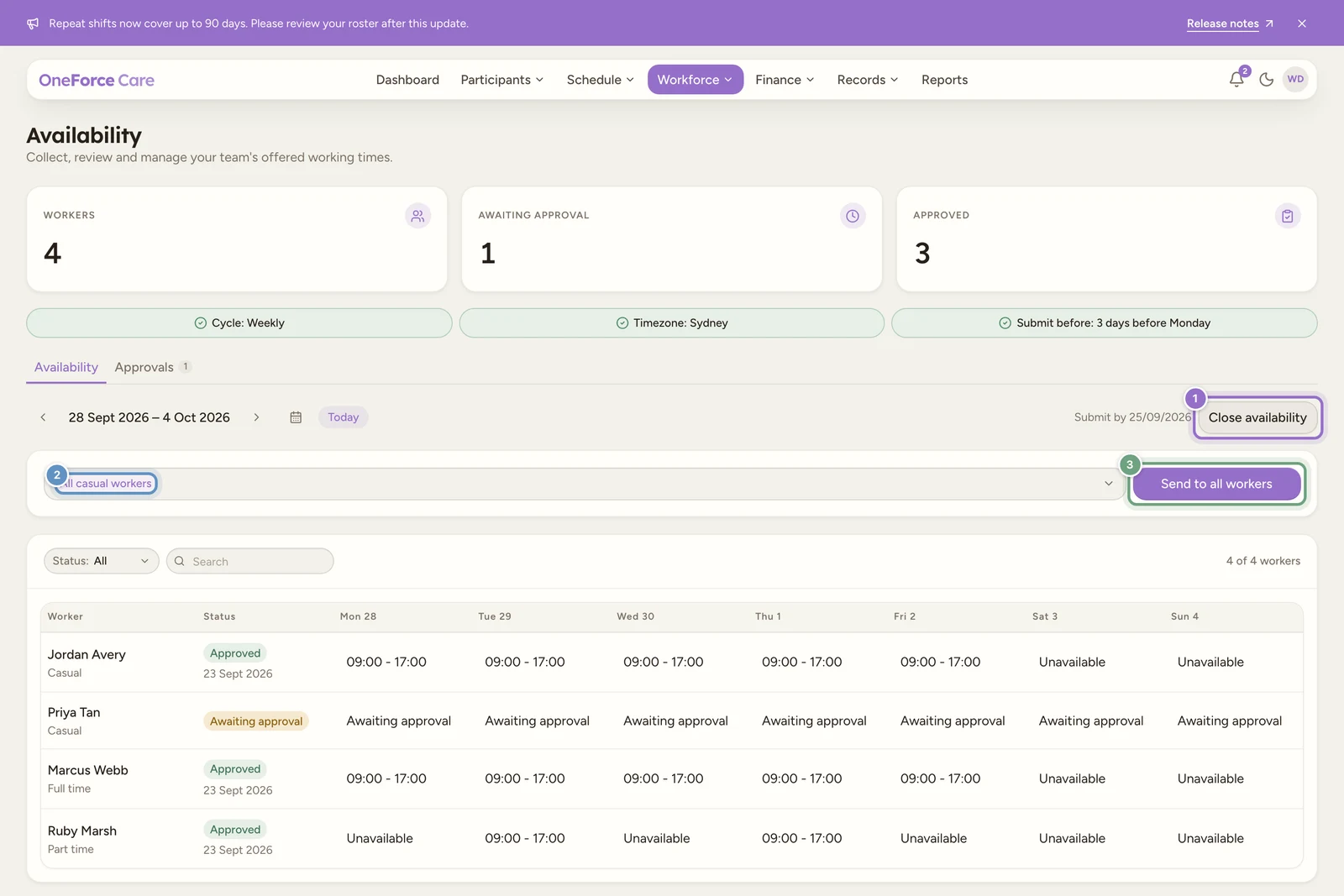
Select Request availability. The recipient field starts at All casual workers. Leave it as it is for everyone eligible, or search and select particular workers.
Send
Select Send to all workers, or Send to workers when you have selected recipients. The worker receives a request that opens the relevant period in their app. The calendar shows Submit by once a request exists.
If the request button is unavailable
Read the message beside it. Set up availability means collection is not configured. Opens gives the date a future period becomes requestable. Period ended, Period closed or Period not open explains why that period cannot be requested.
Only casual support workers appear as recipients. If someone is missing, check their account type and employment type. Set permanent workers’ regular hours directly.
Automatic collection, manual follow-up
Automatic collection creates the initial requests for eligible casual workers. Use the recipient controls when you need to request a period again or follow up selected workers. An existing request is not repeatedly resent by the automatic process.